Edit Text, Block, Dimension, Rtext
SDBox Design Software - Unified content editing tool for CAD drawings
DDE Command DDE
A unified editing tool for modifying content of Text, MText, Block Attributes, Dimensions, and Rtext objects.
The DDE command was originally created for AutoCAD 2000 with the purpose of being a single command that edits content of Text, Blocks, and Dimensions, and opens the folder where an Rtext reads from.
This command provides a consistent interface for modifying various types of textual content in your CAD drawings, streamlining your workflow and reducing the need to switch between different editing tools.
Select Text, MText, RText-file, Block with Attr., Dimension to edit :
Compatibility:
The DDE command is available in AutoCAD 2010-20xx, BricsCAD, GstarCAD, and ZwCAD when using the SDBox add-on software.
Command Overview
Editing content of Text, MText, Attributes of a Block, Dimension values, and Rtext.
The DDE command serves as a centralized editing tool for various text-based objects in your CAD drawings. It intelligently detects the type of object you select and presents the appropriate editing interface.
For Text, MText, and Blocks, the command functions similarly to the corresponding AutoCAD editing commands but with enhanced features and a unified interface.
For Dimensions and Rtext, it offers special functionality described in detail below.
Workflow Advantage:
Using a single command for all text editing tasks reduces cognitive load and improves efficiency, especially when working with drawings containing multiple types of text objects.
Text Editing
Editing single-line text objects with the DDE command.
When you select a Text object, the DDE command opens a simple text editor where you can modify the content directly. This functionality is similar to AutoCAD's standard text editing but integrated into the unified DDE interface.
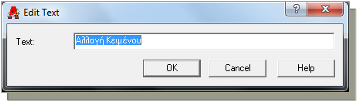
Text editing dialog for single-line text
Usage Notes:
- Supports all standard text formatting options
- Maintains text style and properties
- Provides real-time preview of changes
- Allows multiline editing with Enter key
MText Editing
Editing multiline text objects with advanced formatting options.
When you select an MText object, DDE opens a more comprehensive editor that supports rich text formatting, paragraph styles, bullet points, and other advanced text features.
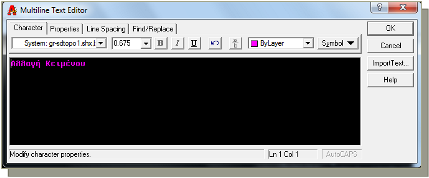
Multiline text editor with formatting options
Advanced Features:
- Rich text formatting (bold, italic, underline)
- Paragraph alignment and indentation
- Bulleted and numbered lists
- Column layouts for technical documentation
- Import/export of text content
Block Attribute Editing
Editing attribute values within block references.
When you select a Block containing attributes, DDE presents a dialog showing all attribute definitions and their current values. You can edit individual attributes or modify multiple attributes simultaneously.
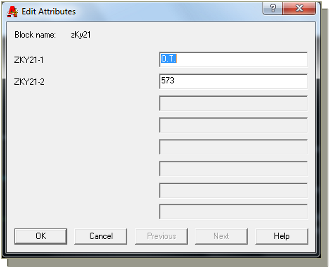
Block attribute editing interface
Attribute Management:
The command preserves attribute definitions (tags, prompts, defaults) while allowing you to edit the displayed values. This is particularly useful for title blocks, symbols, and other standardized elements.
Common Applications:
- Updating title block information
- Modifying symbol attributes
- Editing equipment tags and labels
- Updating revision information
Dimension Editing
Special editing capabilities for dimension objects.
The DDE command provides enhanced functionality for dimension editing, including the ability to restore actual measured values or use them within phrases.
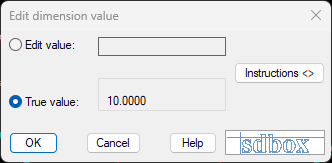
Restoring actual dimension value
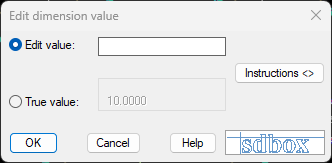
Entering custom text for dimension
Actual Value Restoration:
You can restore the actual measured value of a dimension at any time. This is useful when dimensions have been overridden with custom text and need to be reset to their accurate measurements.
Custom Text and Phrases:
You can enter other values or phrases that will be displayed on screen for the dimension. The actual value can be used within a phrase as explained in the instructions below:
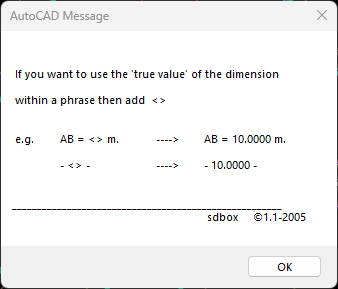
Dimension text formatting and phrase construction
Practical Examples:
O<>- Displays diameter symbol followed by actual valueApprox. <> mm- Adds prefix and suffix to actual valueSee detail <>- Uses actual value in instructional textMax. <> tolerance- Combines actual value with specifications
The <> placeholder represents the actual measured dimension value.
RText Editing
Editing Rtext objects that read from external files.
The command only works with Rtext objects that read from a file. When you select such an Rtext object, DDE opens the associated file for editing.
Rtext (Remote Text) is a special type of text object in CAD that displays content from an external text file. This is particularly useful for notes, specifications, or other content that needs to be consistent across multiple drawings or frequently updated.
Common RText Applications:
- General notes and specifications
- Drawing revision history
- Standard disclaimers and copyright notices
- Project descriptions and scope
- Material schedules and legends
File Management:
When editing Rtext, you're actually modifying the external text file that the Rtext object references. Changes made to this file will automatically update in all drawings that reference it.
Best Practices:
- Store Rtext files in a centralized project folder
- Use descriptive filenames for different note types
- Implement version control for important specification files
- Create templates for commonly used Rtext content