Navigation Toolbar
For AutoCAD 2010-20xx, BricsCAD, GstarCAD, ZwCAD
Toolbar Overview
When the following Toolbar appears, you can navigate in the drawing with the mouse wheel and execute all the commands it contains.
Navigation is done with the mouse on the screen (middle wheel for zoom in, zoom out and pan).
Do not execute other AutoCAD commands while the Toolbar is open because the command that opened it will terminate.
Toolbar Commands
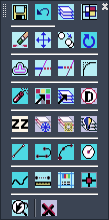
Command Explanations
The AutoCAD and SDBOX commands contained in the Toolbar have been selected so you can navigate in the Drawing, manage Layers and make changes.