Attribute Editing in Blocks
SDBox Design Software - Command guide for managing and editing attributes in CAD blocks
Attribute Editing ZZATT
Editing content of Attributes in Blocks. Conversion to Uppercase or lowercase, adding phrases at the beginning or end, changing phrases, changes to Color, Layer or TextStyle.
The command is executed simultaneously on the desired Attributes of the selected Blocks.
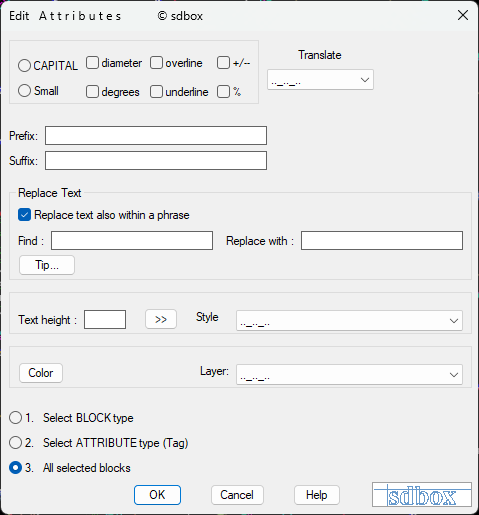
Main attribute editing dialog interface
Note:
This command allows for batch editing of multiple attributes across different blocks simultaneously, saving significant time when managing large drawings with many similar blocks.
Basic Text Conversion
Various text transformation options available in the command:

Basic text conversion options
Conversion Options:
- UPPERCASE: All alphabetic characters in phrases are converted to UPPERCASE (accents remain).
- lowercase: All alphabetic characters in phrases are converted to lowercase.
- diameter: The diameter symbol is added at the beginning of each phrase. (O)
- degrees: The degrees symbol is added at the end of each phrase. (°)
- overline: Each phrase is overlined. (adds %%o at the beginning)
- underline: Each phrase is underlined. (adds %%u at the beginning)
- +/-: The ± symbol is added at the beginning of each phrase. (%%p)
- %: The % symbol is added at the end of each phrase. (%%%)
Tip:
These conversion options can be combined with other modifications for comprehensive attribute management.
Text Addition and Modification

Text addition options
Text Addition Options:
- Add text Left: Whatever phrase you type in the corresponding field is added at the beginning of each phrase.
- Add text Right: Whatever phrase you type in the corresponding field is added at the end of each phrase.
Example of text modification in attributes
Usage:
Use these options to add prefixes or suffixes to multiple attributes simultaneously, such as adding unit symbols or reference codes.
Search and Replace
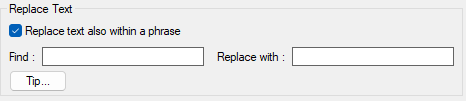
Search and replacement of individual words or phrases in the texts of Attributes you will select.
Key Features:
- Change characters within phrases: If you want to replace a word that appears anywhere in the text, including within longer phrases.
- Change only whole words: Replace only when the text consists exclusively of the word to be changed.
- Case sensitive: Uppercase and lowercase are treated as different.
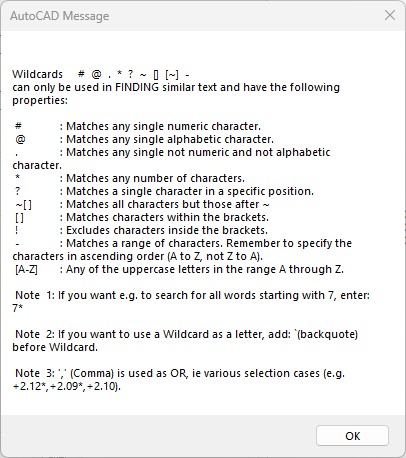
Detailed search and replace interface
Search Field:
Enter the word or phrase you want to change. You can also enter Wild-card characters for complex searches.
Replace Field:
Enter the replacement word or phrase. If left empty, the words or phrases for change are removed from the texts.
Note:
Wild-card characters are not recommended in the replacement field because they are taken as normal letters during replacement.
Text Properties

Text height adjustment options
Text Height: You can type a new height or use ">>" to select some text or Attribute on the drawing screen to record its height.

Color, style and layer modification options
Property Modification:
- Color: Select color for all Attributes that will be selected.
- Style: Select Text Style from existing ones in the Drawing for all Attributes that will be selected.
- Layer: Select Layer for all Attributes that will be selected.
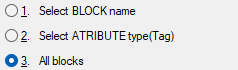
Block and attribute selection type options
^ Back to topSelection Options
Selection Methods:
- I will select Block type: After clicking OK on the tab, you will be asked to select a Block and then only Blocks with the same name as that will be selected.
- I will select Attribute type: After clicking OK on the tab, you will be asked to select an Attribute of a Block and then from whichever Blocks are selected, the command will be executed only on the Attribute of those Blocks that have the same name as the selected Attribute.
- All selection Blocks: After clicking OK on the tab, you will select whichever Blocks you want regardless of Block name or Attribute name.
Command Usage:
Mass corrections of Attributes, addition or removal of phrases in many Attributes simultaneously, and control of batch processing.
Tips:
The first few times you use the command, it is recommended to do simple examples to familiarize yourself with phrase editing in the complex search and replacement section.
Watch the tutorial video for a practical demonstration: ZZATT Tutorial on YouTube